

Search Blog
Recent Posts
-
 Ecommerce SEO for Google &...
Learn how online stores can improve visibility in Google, AI Overviews, ChatGPT, Gemini, and other AI search...
Jun 8, 2026 Read more
Ecommerce SEO for Google &...
Learn how online stores can improve visibility in Google, AI Overviews, ChatGPT, Gemini, and other AI search...
Jun 8, 2026 Read more -
 How to Use PrestaShop...
This blog post looks into how you can use prestashop modules effectively and how you can enhance your store's...
May 5, 2026 Read more
How to Use PrestaShop...
This blog post looks into how you can use prestashop modules effectively and how you can enhance your store's...
May 5, 2026 Read more -
 Best Shopping Cart for SEO...
This blog compares the best shopping cart platforms for SEO in 2026, including Shopify, WooCommerce, Magento,...
Apr 20, 2026 Read more
Best Shopping Cart for SEO...
This blog compares the best shopping cart platforms for SEO in 2026, including Shopify, WooCommerce, Magento,...
Apr 20, 2026 Read more -
 Canonical vs Hreflang Tag:...
Canonical tags prevent duplicate content by selecting a preferred page, while hreflang tags target language and...
Apr 13, 2026 Read more
Canonical vs Hreflang Tag:...
Canonical tags prevent duplicate content by selecting a preferred page, while hreflang tags target language and...
Apr 13, 2026 Read more -
 PrestaShop 9.1: A Major...
Learn what’s new in PrestaShop 9.1, including performance upgrades, modern architecture, and improved developer...
Apr 6, 2026 Read more
PrestaShop 9.1: A Major...
Learn what’s new in PrestaShop 9.1, including performance upgrades, modern architecture, and improved developer...
Apr 6, 2026 Read more

How to Enable PrestaShop Friendly URLs (Complete SEO Guide + Remove Product IDs)
Posted On: May 3, 2023
Categories: PrestaShop SEO Best Practices: Guides, Checklists & Tips
Clean, descriptive URLs play an important role in improving your PrestaShop store's SEO and user experience. Enabling PrestaShop Friendly URLs makes your links easier to read, share, and understand for both visitors and search engines.
In this guide, you'll learn how to enable Friendly URLs, configure URL rewriting, customize the URL schema, regenerate your sitemap, and create cleaner URLs for better SEO performance. We'll also explain why product and category IDs appear in URLs and how you can remove them.
What Are PrestaShop Friendly URLs?
PrestaShop Friendly URLs are clean, descriptive web addresses that replace the default URLs containing IDs, numbers, and special characters. They make your store's pages easier for customers to read and help search engines better understand your content.
By default, PrestaShop generates URLs with unique IDs to identify products and categories, which can make links look cluttered. Enabling Friendly URLs creates cleaner, keyword-rich URLs, while removing IDs completely requires a dedicated module.
How to Enable PrestaShop SEO Friendly URLs?
Pursue link structures that are short, easy to scan and understand, attractive, and memorable. Follow this step-by-step guide to create SEO-friendly URLs for your PrestaShop store.
Step 1: Log on to your store, access the dashboard, and navigate to the Configure section.
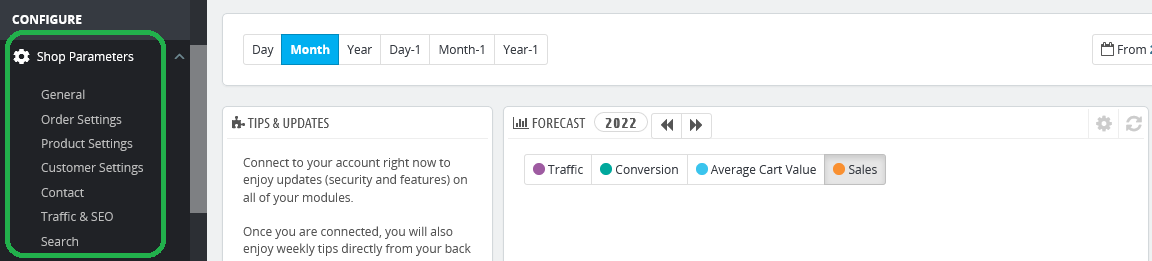
Step 2: Click Shop Parameters to find Traffic and SEO settings.
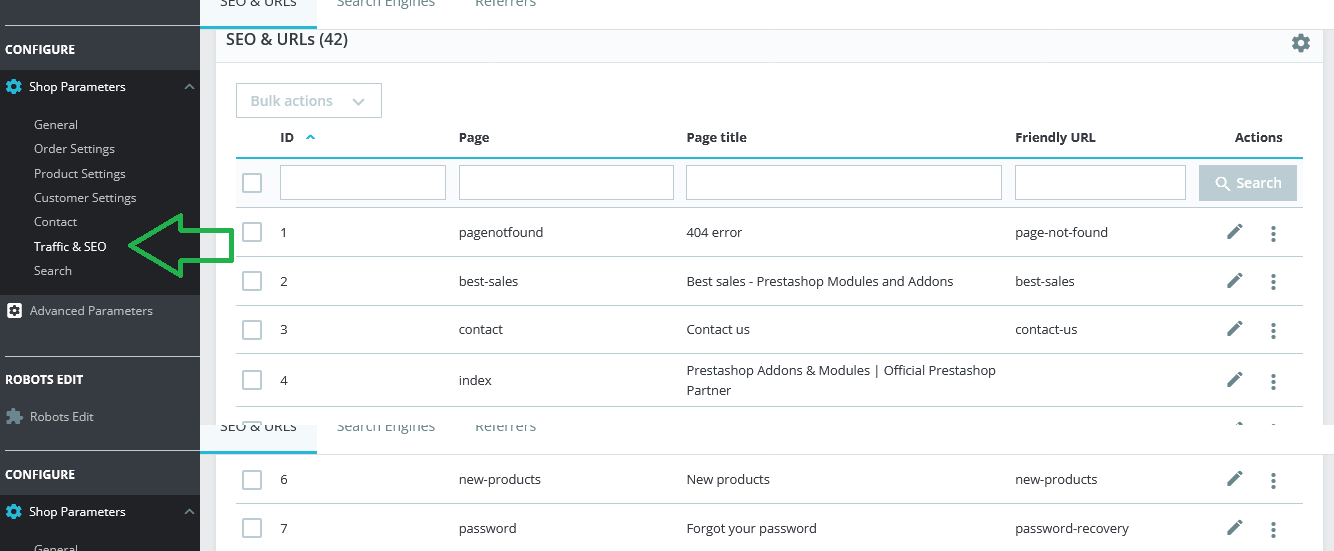
Step 3: Enable Friendly URL by clicking “Yes.” The feature may not be enabled if your store server does not support URL rewriting. Before moving with this option, it is better to ask the server provider and activate the rewrite mode if you have not done so before.
Step 4: Disable Accented URLs to prevent PrestaShop from adding special characters to URLs for products with non-ASCII names.
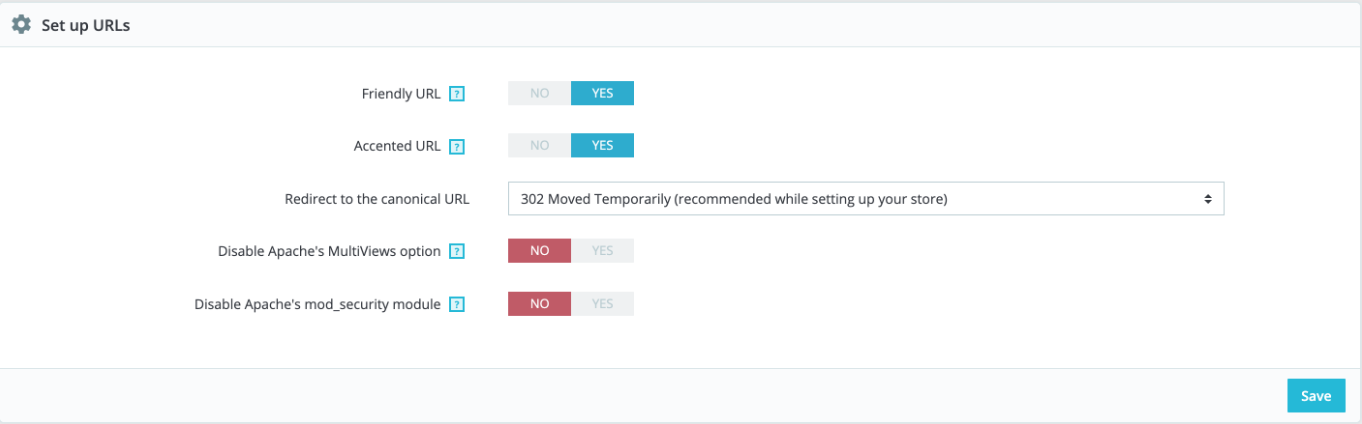
Step 5: Set canonical redirection to prevent URL duplication. If two or more URLs are redirected to a similar page, this option will specify the preferred version to gain SEO advantage.
Step 6: Once you are done with the SEO-friendly configuration, you can continue with the Schema of URLs. It helps you instruct PrestaShop on how it generates URLs for products, categories, or any CMS page.
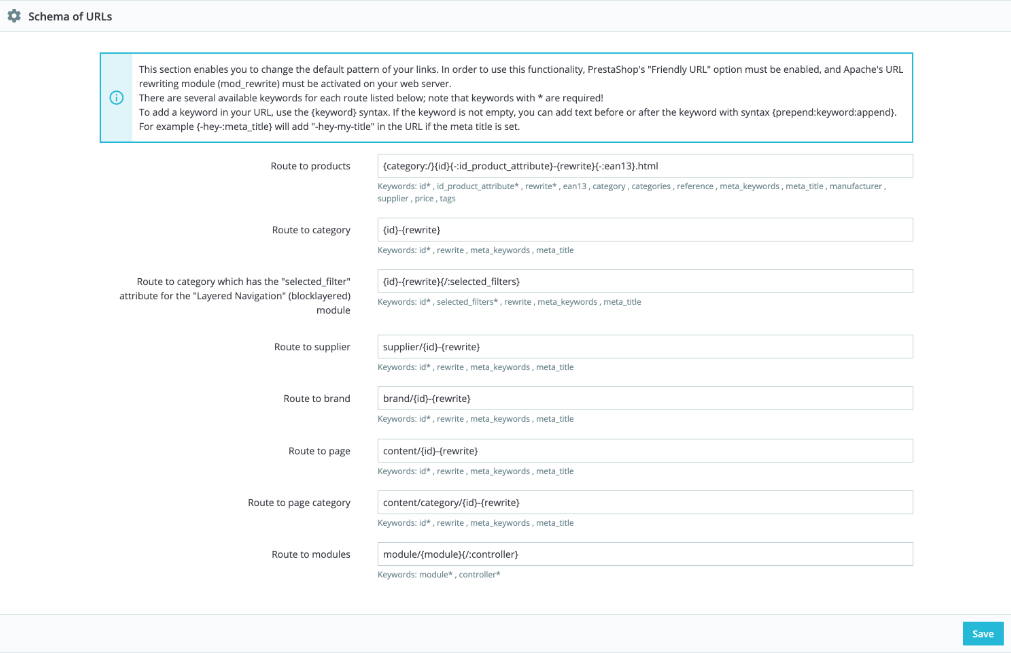
Step 7: Modify the format for each schema of URLs and click save.
These PrestaShop-friendly URL settings can help you pursue removing the unwanted texts and characters in the URL structure. However, it does not remove the ID from the URL, which still makes the URLs difficult to read, remember, and rank. You may need to install a module such as Pretty URLs to clean up the clutter and making them easier for visitors and search engines to understand.
Step 8: Sitemap Generation.
Once you have configured friendly URLs, it's advisable to regenerate your sitemap. A sitemap helps search engines index your site more effectively.
How do I rewrite a URL to get a PrestaShop Clean URL?
You can rewrite the URL or add a new friendly URL for each product, category, or static content page. Find the option rewritten URL while configuring the page name, title, meta description, and meta keywords. However, the rewritten URLs may still include an ID you will never want the visitors to notice.
Rewrite using Schema URLs
You can use the Schema of URLs to modify or rewrite URL structures for products and category pages of the PrestaShop store.
Navigate to the SEO and URLs page of the Traffic and SEO settings tab. Change the route to a resource you want to modify. It can be a product, category, supplier, brand, or any page.
For example, if a URL of a product page generates like:
http://mystore.com/men/7-6-blue-geans.html/3-size-m
It may have a route
{category:/}{id}{-:id_product_attribute}-{rewrite}{-:ean13}.html
To make it SEO friendly URL, you need to remove the HTML and the ID. You cannot remove the unwanted IDs until you install a module for it. However, here, you can change its position. So after customization, it may appear like this:
http://mystore.com/men/blue-geans-7-6/3-size-m
With a route
{category:/}{-:id_product_attribute}-{rewrite}{-:ean13}-{id}
Pursuing PrestaShop Friendly URLs is effective in optimizing your store URLs for better readability and SEO performance. Being one of the pioneering eCommerce platforms, PrestaShop also adds numbers, IDs, and special characters to URLs.
Store users tend to read or scan a web address. They expect the URLs to be clean and easy to remember and refer to a family or friend. URL structure makes no sense if it includes numbers, IDs, and special characters. It needs to be removed for better SEO prospects, too.
You can use the SEO and URLs settings in the PrestaShop dashboard to clean the URLs to some extent, as there is no option to remove the IDs. Before moving further, first, differentiate between a friendly and unfriendly URL with examples.
What is a PrestaShop Friendly URL?
A URL that is free from unnecessary codes, characters, and numbers is called a friendly URL. PrestaShop, by default, generates a form of URL that is not user-friendly. Once you remove the unwanted characters and make them readable, it becomes a friendlier one.
If you add a Polo shirt to the Shirts category of a clothing store, you will get a URL in the form of:
www.mystore.com/7-45657/454-27654348.html
Its PrestaShop-friendly URL version is like this:
www.mystore.com/3-shirts/7-polo/
PrestaShop adds an ID to each product and category page link to prevent link duplication. If you want to remove such IDs from the URL, you may need to install a module for it.
Our Prestashop Pretty URL is one of the top-rated modules that can help you make your URLs ultimately clean by removing IDs from the URLs.
Conclusion
Enabling PrestaShop Friendly URLs is a simple yet effective way to improve your store's URL structure, making it easier for customers to navigate and helping search engines crawl and index your pages more efficiently. By configuring Friendly URLs, URL schema, canonical redirection, and regenerating your sitemap, you can build a stronger SEO foundation for your store.
While PrestaShop's built-in settings can significantly clean up your URLs, they don't completely remove product and category IDs. If you want fully clean, ID-free URLs for better readability and SEO, a dedicated solution like the PrestaShop Pretty URLs module can help you achieve that with minimal configuration.